This website is managed by Ultima Markets’ international entities, and it’s important to emphasise that they are not subject to regulation by the FCA in the UK. Therefore, you must understand that you will not have the FCA’s protection when investing through this website – for example:
You will not be guaranteed Negative Balance Protection
You will not be protected by FCA’s leverage restrictions
You will not have the right to settle disputes via the Financial Ombudsman Service (FOS)
You will not be protected by Financial Services Compensation Scheme (FSCS)
Any monies deposited will not be afforded the protection required under the FCA Client Assets Sourcebook. The level of protection for your funds will be determined by the regulations of the relevant local regulator.
Note: UK clients are kindly invited to visit https://www.ultima-markets.co.uk/. Ultima Markets UK expects to begin onboarding UK clients in accordance with FCA regulatory requirements in 2026.
If you would like to proceed and visit this website, you acknowledge and confirm the following:
1.The website is owned by Ultima Markets’ international entities and not by Ultima Markets UK Ltd, which is regulated by the FCA.
2.Ultima Markets Limited, or any of the Ultima Markets international entities, are neither based in the UK nor licensed by the FCA.
3.You are accessing the website at your own initiative and have not been solicited by Ultima Markets Limited in any way.
4.Investing through this website does not grant you the protections provided by the FCA.
5.Should you choose to invest through this website or with any of the international Ultima Markets entities, you will be subject to the rules and regulations of the relevant international regulatory authorities, not the FCA.
Ultima Markets wants to make it clear that we are duly licensed and authorised to offer the services and financial derivative products listed on our website. Individuals accessing this website and registering a trading account do so entirely of their own volition and without prior solicitation.
By confirming your decision to proceed with entering the website, you hereby affirm that this decision was solely initiated by you, and no solicitation has been made by any Ultima Markets entity.
Learn how to optimise Expert Advisors (EAs) on MT5. Discover the benefits, setup process, backtesting, optimisation, and best practices for algorithmic trading.
How to Optimise Expert Advisors (EAs) in MetaTrader 5 (MT5)
An Expert Advisor (EA) is an automated trading system designed to execute trades based on pre-programmed rules. EAs operate on the MetaTrader 5 (MT5) platform, removing the need for manual intervention by analysing market conditions and placing trades automatically.
Traders use EAs to ensure their trading strategies’ precision, efficiency, and discipline.
Importance of Optimization in Algorithmic Trading
While an EA can execute trades effectively, its performance heavily depends on how well it is configured. Market conditions change over time, meaning an EA that worked well in the past may not remain profitable.
Optimisation is the process of fine-tuning an EA’s parameters to adapt to different market conditions, enhancing its profitability and stability.
Without optimisation, an EA may:
Perform well in certain conditions but fail in others.
Be overfitted to past data, leading to poor real-time performance.
Struggle to manage risk effectively due to poorly calibrated parameters.
Overview of the MT5 Strategy Tester
MT5 provides a powerful Strategy Tester tool, which allows traders to backtest and optimise their EAs. This tool simulates trading based on historical data to determine how an EA would have performed under different conditions.
Key features of the MT5 Strategy Tester include:
Backtesting: Running an EA against historical data to assess performance.
Optimisation: Finding the best parameter combinations for maximum profitability.
Multi-Threaded Processing: Using multiple CPU cores to speed up the testing process.
Genetic Algorithm Optimization: A smart method that selects the best settings without testing every possible combination.
Forward Testing: Ensuring that optimised settings remain effective in unseen market conditions.
By understanding the importance of EA optimisation and how the MT5 Strategy Tester works, traders can fine-tune their automated strategies to achieve better performance and adapt to changing markets.
What Does Optimization Mean in MT5?
Optimisation in MT5 refers to systematically adjusting an Expert Advisor’s (EA) parameters to improve performance. The goal is to identify the best possible settings that maximise profitability, reduce drawdowns, and improve trading consistency.
The MT5 Strategy Tester allows traders to run multiple backtests using different combinations of input parameters, evaluating the EA’s performance under historical market conditions. By doing so, traders can find optimal settings that align with their trading goals.
While both backtesting and optimisation are essential for EA development, they serve different purposes:
Feature
Backtesting
Optimisation
Purpose
Tests the EA’s performance using a fixed set of parameters.
Finds the best combination of parameters for optimal performance.
Execution
Runs a single test based on past data.
Runs multiple tests with different parameter settings.
Time Required
Relatively fast, as only one test is performed.
Can be time-consuming, especially with large datasets.
Outcome
Provides a performance report with key statistics.
Identifies the best parameter set based on selected criteria.
Benefits of Optimizing an EA
Optimising an EA is essential for improving its trading efficiency and adapting it to various market conditions. Some key benefits include:
Improved Profitability: Traders can enhance the EA’s profitability by fine-tuning settings such as lot size, stop loss, and take profit levels.
Better Risk Management: Optimization helps adjust risk parameters to reduce drawdowns and protect capital.
Adaptability to Market Changes: Markets evolve, and an optimised EA can adjust to different volatility levels, trends, and price action patterns.
Enhanced Execution Speed: Efficient settings improve execution times, reducing slippage and order delays.
Prevention of Overfitting: Proper optimisation ensures the EA performs well in both past and future market conditions rather than being overly tuned to historical data.
Preparing for Optimization
Proper preparation is crucial before running an optimisation in MetaTrader 5 (MT5). A well-prepared setup ensures reliable results and prevents common pitfalls like overfitting. Traders must select the right EA, set up historical data, choose the best trading pairs and timeframes, and configure EA parameters for optimisation.
Selecting the Right EA
Not all Expert Advisors (EAs) are designed for optimisation. Some may have hard-coded parameters that cannot be adjusted, while others may require manual input for certain conditions. Before optimising, you must ensure:
The EA allows parameter modifications.
It has adjustable stop-loss, take-profit, lot size, and strategy-related inputs.
It is designed to work in different market conditions, not just a single scenario.
It supports historical backtesting and optimisation.
If an EA lacks flexibility, optimisation won’t be effective.
Setting Up Historical Data
The accuracy of optimisation depends on the quality of historical price data. If the data is incomplete or low-quality, optimisation results may not reflect real market conditions.
Steps to Set Up High-Quality Historical Data:
Download the Correct Market Data:
Open MT5 → Go to View → Select Symbols.
Download historical data for the trading instrument you want to optimise.
Ensure a Long Enough Data Range:
Use at least 2-5 years of historical data for robust results.
The longer the period, the better the EA adapts to different market conditions.
Check Data Accuracy & Gaps:
Look for missing data points or irregular price movements.
Use tick data, if available, for the most precise simulation.
Download historical data from Symbols options in MT5
Choosing a Suitable Trading Pair and Timeframe
The effectiveness of an EA depends on the currency pair or asset being traded and the timeframe in which it operates.
Selecting a Currency Pair or Asset
If the EA is designed for a specific instrument (e.g., EUR/USD, NAS100, or Gold), optimise it for that pair.
If the EA is a multi-asset strategy, test it across different instruments to identify the best-performing one.
Avoid optimising for exotic pairs unless the EA is specifically designed for them due to high spreads and low liquidity.
Choosing the Right Timeframe
The timeframe selection depends on the EA’s trading style:
Trading Style
Recommended Timeframe
Scalping
M1, M5, M15
Intraday
M15, M30, H1
Swing Trading
H4, D1
Long-Term
D1, W1
If unsure about the timeframes, start with H1 and then refine based on results.
Configuring Initial EA Parameters
Before optimisation, define which EA settings to optimise and which to keep fixed.
Optimisation requires defining minimum, maximum, and step values for each parameter.
Parameter
Min Value
Max Value
Step
Take Profit (TP)
20 pips
100 pips
5 pips
Stop Loss (SL)
10 pips
50 pips
5 pips
Lot Size
0.1
1.0
0.1
Moving Average Period
10
100
5
Traders must use logical ranges—too many values slow down optimisation, while too few reduce accuracy.
Using the MT5 Strategy Tester for Optimization
The MT5 Strategy Tester is a powerful tool for optimizing Expert Advisors (EAs). It allows traders to test multiple parameter combinations, simulate real market conditions, and determine the most effective settings.
Navigating the Strategy Tester Interface
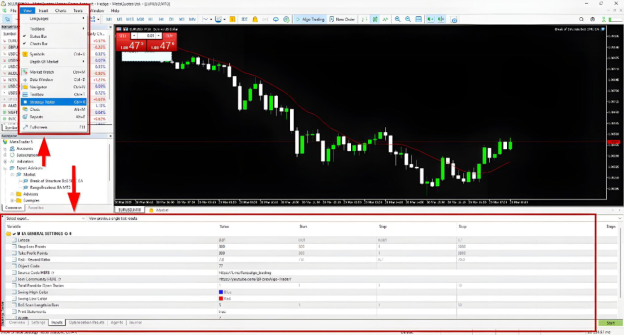
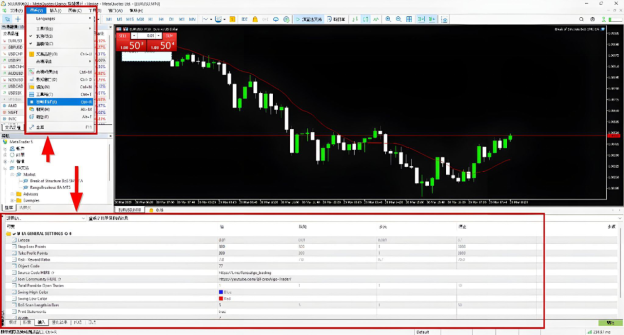
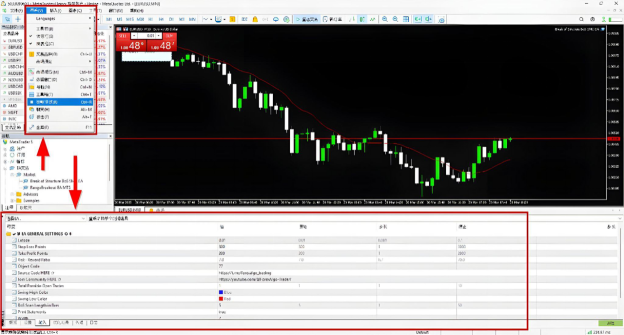
To access the MT5 Strategy Tester:
Open MT5.
Go to View → Strategy Tester (or press Ctrl + R).
The Strategy Tester panel will appear at the bottom of the screen.
The interface consists of several sections:
Section
Purpose
EA Selection
Choose the EA to optimise.
Symbol & Timeframe
Select the currency pair and timeframe for testing.
Model Selection
Choose how price data is simulated (tick, OHLC, etc.).
Optimisation Mode
Select whether to use a full or genetic algorithm.
Parameter Settings
Define which inputs will be optimised and their range.
Execution Settings
Set deposit amount, leverage, and spread conditions.
Results Tab
View the performance of different parameter combinations.
Strategy Tester options in MT5 (EN)
Strategy Tester options in MT5 (TC)
Strategy Tester options in MT5 (SC)
Choosing the Right Optimization Mode
MT5 offers two primary optimisation modes:
1. Slow (Full) Optimization: It tests all possible combinations of input parameters and provides the most accurate results but is time-consuming. It is suitable for small parameter ranges or when high accuracy is needed.
2. Fast Genetic Algorithm (GA) Optimization: It uses machine learning techniques to find the best settings, prioritises high-performing parameter combinations and eliminates weaker ones. It is much faster than full optimisation and is ideal for large parameter ranges.
It is recommended that the Genetic Algorithm be used first to identify promising settings, then refined with Full Optimization.
Defining Input Parameters for Optimization
To optimise an EA, define which parameters should change and set their ranges:
Click on Inputs in the Strategy Tester.
Check the box next to each parameter you want to optimise.
Set Min, Max, and Step values for each parameter.
Selecting the Best Testing Model
MT5 provides different testing models for optimisation. The choice depends on speed vs. accuracy.
Testing Model
Speed
Accuracy
Best Use Case
Every Tick
Slow
High
Scalping & precise strategies
1-Minute OHLC
Medium
Medium
Swing & intraday trading
Open Prices Only
Fast
Low
Initial quick testing
For scalping EAs, use “Every Tick”; for a balanced speed and accuracy, use “1-Minute OHLC”.
Adjusting Spread, Slippage, and Trading Conditions
For realistic optimisation, ensure market conditions reflect real trading scenarios.
1. Spread Settings: While optimising, you can use fixed or variable spreads. You can also set a realistic spread or use the current speed for a real-market simulation.
2. Slippage Settings: It accounts for order execution delays. You must set a reasonable value (e.g., 2-3 pips for volatile markets).
3. Initial Deposit & Leverage: You must set a realistic deposit amount and leverage (e.g., $10,000 with 1:100).
Analysing Optimization Results
Once the Expert Advisor (EA) optimisation process in MetaTrader 5 (MT5) is complete, the next step is to analyse the results to ensure the selected parameters offer a balance of profitability, stability, and risk control.
Understanding Optimization Metrics
MT5 provides several key metrics in the Optimization Results tab. Each of these metrics helps evaluate the EA’s overall performance.
Metric
Description
Ideal Value
Net Profit
Total profit after losses
Higher is better, but not the only indicator
Drawdown (%)
Maximum drop in balance/equity
Below 20% for low risk
Profit Factor (PF)
Ratio of gross profit to gross loss
PF > 1.5 is good, >2.0 is excellent
Win Rate (%)
Percentage of profitable trades
40-60% is acceptable if R:R is high
Expected Payoff
Average profit per trade
Higher is better
Sharpe Ratio
Risk-adjusted return
Above 0.5 is acceptable, above 1.0 is excellent
Recovery Factor
Net profit ÷ max drawdown
Above 3.0 is strong
Stability Factor
Measures consistency
The closer to 1.0, the better
Identifying the Best Performing Settings
After running optimisation, MT5 ranks parameter combinations based on net profit by default. However, blindly choosing the most profitable result can be risky.
Sort results by Profit Factor (PF): A setting with a high PF is more sustainable than one with extreme profits but a low PF.
Check the Drawdown column: If two settings have similar profits but one has a much lower drawdown, choose the safer option.
Look at the Recovery Factor: This tells you how efficiently the EA recovers from losses.
Ensure a Smooth Equity Curve: Avoid results with sharp fluctuations.
Test the settings in Forward Testing: Apply them to a demo account before live trading.
Detecting Overfitting
Overfitting happens when an EA is optimised too specifically for past data, making it perform well in backtests but fail in live trading.
Huge drop in performance when tested on different timeframes or assets.
Ways to prevent overfitting:
Use Walk-Forward Testing: Check if the EA works on unseen market conditions.
Test on Different Market Conditions: Ensure the EA performs well in trending, ranging, and volatile markets.
Avoid Over-Optimizing Parameters: More parameters optimised = higher risk of curve fitting.
Analysing the Equity Curve & Performance Graph
MT5 provides graphical data in the Results and Graph tabs, helping you visually assess an EA’s stability.
Equity Curve Type
Interpretation
Smooth upward growth
Ideal performance, good consistency.
Slow rise with occasional dips
Acceptable, but check drawdown.
Steep spikes, deep crashes
Overfitted or high-risk EA.
Flat or downward slope
Non-profitable, needs adjustments.
Comparing Different Optimization Runs
To get the best possible EA settings, compare different optimisation tests. To compare different optimisation tests effectively, traders must:
Run tests on different market conditions: Check if the EA performs well across different years.
Test multiple timeframes: A good EA should work on H1, H4, and D1, not just one specific timeframe.
Compare across different brokers: Some settings may work better on ECN vs. standard accounts.
Check performance in different asset classes: If an EA is designed for forex, see if it works on indices or commodities.
After analysing the resu
Trade with Ultima Markets
Ultima Markets is a fully licensed broker and a multi-asset trading platform offering access to
250+ CFD financial instruments, including Forex, Commodities, Indices and Shares. We
guarantee tight spreads and fast execution. Until now, we have served clients from 172
countries and regions with our trustworthy services and well-built trading systems.
Ultima Markets has achieved remarkable recognition in 2024, winning prestigious awards
such as the Best Affiliates Brokerage, Best Fund Safety in Global Forex Awards, and
the Best APAC CFD broker in Traders Fair 2024 Hong Kong. As the first CFD broker to join
the United Nations Global Compact, Ultima Markets underscores its commitment to
sustainability and the mission to advance ethical financial services and contribute to a
sustainable future.
Ultima Markets is a member of The Financial Commission, an international independent
body responsible for resolving disputes in the Forex and CFD markets.
All clients of Ultima Markets are protected under insurance coverage provided by Willis
Towers Watson (WTW), a global insurance brokerage established in 1828, with claims
eligibility up to US$1,000,000 per account.
Open an account with Ultima Markets to start your index CFDs trading journey.
Share Now
Disclaimer:This content is provided for informational purposes only and does not constitute, and should not be construed as, financial, investment, or other professional advice. No statement or opinion contained herein should be considered a recommendation by Ultima Markets or the author regarding any specific investment product, strategy, or transaction. Readers are advised not to rely solely on this material when making investment decisions and should seek independent advice where appropriate.
Thank you for visiting the Ultima Markets website. Please note that this website is intended for individuals residing in jurisdictions where access is permitted by law. Ultima and its affiliated entities do not operate in your home jurisdiction.
By clicking ‘Acknowledge’, you confirm that you are entering this website solely on your own initiative and not as a result of any specific marketing outreach. You wish to obtain information from this website based on reverse solicitation principles, in accordance with the applicable laws of your home jurisdiction.