Important Information

This website is managed by Ultima Markets’ international entities, and it’s important to emphasise that they are not subject to regulation by the FCA in the UK. Therefore, you must understand that you will not have the FCA’s protection when investing through this website – for example:

  • You will not be guaranteed Negative Balance Protection
  • You will not be protected by FCA’s leverage restrictions
  • You will not have the right to settle disputes via the Financial Ombudsman Service (FOS)
  • You will not be protected by Financial Services Compensation Scheme (FSCS)
  • Any monies deposited will not be afforded the protection required under the FCA Client Assets Sourcebook. The level of protection for your funds will be determined by the regulations of the relevant local regulator.

Note: UK clients are kindly invited to visit https://www.ultima-markets.co.uk/. Ultima Markets UK expects to begin onboarding UK clients in accordance with FCA regulatory requirements in 2026.

If you would like to proceed and visit this website, you acknowledge and confirm the following:

  • 1.The website is owned by Ultima Markets’ international entities and not by Ultima Markets UK Ltd, which is regulated by the FCA.
  • 2.Ultima Markets Limited, or any of the Ultima Markets international entities, are neither based in the UK nor licensed by the FCA.
  • 3.You are accessing the website at your own initiative and have not been solicited by Ultima Markets Limited in any way.
  • 4.Investing through this website does not grant you the protections provided by the FCA.
  • 5.Should you choose to invest through this website or with any of the international Ultima Markets entities, you will be subject to the rules and regulations of the relevant international regulatory authorities, not the FCA.

Ultima Markets wants to make it clear that we are duly licensed and authorised to offer the services and financial derivative products listed on our website. Individuals accessing this website and registering a trading account do so entirely of their own volition and without prior solicitation.

By confirming your decision to proceed with entering the website, you hereby affirm that this decision was solely initiated by you, and no solicitation has been made by any Ultima Markets entity.

I confirm my intention to proceed and enter this website Please direct me to the website operated by Ultima Markets , regulated by the FCA in the United Kingdom

MetaTrader 5 (MT5)

แพลตฟอร์มเทรดฟอเร็กซ์และ CFD

MetaTrader 5 MetaTrader 5

ดาวน์โหลด MetaTrader 5 (MT5) –
แพลตฟอร์มเทรดฟอเร็กซ์และ CFD ที่ดีที่สุดของคุณ

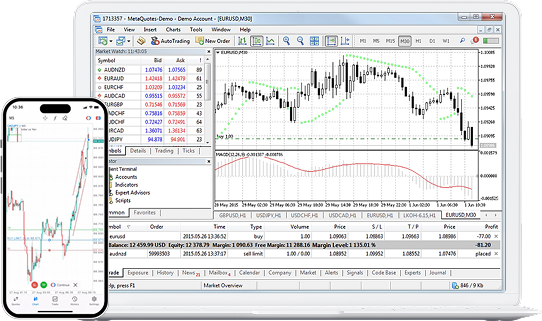
ยินดีต้อนรับสู่อนาคตของการเทรดกับ MetaTrader 5 (MT5) – แพลตฟอร์มเทรดหลายสินทรัพย์ที่ดีที่สุด ออกแบบมาเพื่อฟอเร็กซ์ หุ้น CFD และอื่นๆ ด้วยเครื่องมือวิเคราะห์ขั้นสูง เทคโนโลยีทันสมัย และฟีเจอร์อัจฉริยะที่จะพาคุณก้าวสู่ระดับถัดไปในการเทรด
ดาวน์โหลดตอนนี้สำหรับ PC, เว็บ, หรือแอปมือถือ ios หรือ Android!

What are the benefits of the MT5 trading system?

Intelligent Trading Tools :

  • AI Risk Management

    AI Risk Management:

    Automatically monitor market volatility, trigger stop-loss and take-profit orders, and minimize risks.

  • Copy Trading System

    Copy Trading System:

    Follow top traders and replicate their strategies effortlessly, lowering the barrier for beginners.

  • Big Data Analysis

    Big Data Analysis:

    Access market sentiment indicators, position distribution, and advanced analytics charts to make informed decisions.

เทรดได้ทุกที่ ทุกเวลา

MT5 มีให้บริการบน Windows, Mac, iOS, Android และเว็บ! ไม่ว่าคุณจะอยู่ที่ไหน เมื่อไหร่ก็ตามที่คุณต้องการ MT5 ทำให้ประสบการณ์การเทรดของคุณไม่มีการหยุดชะงัก!

Trade Anytime

ทำไมต้องเป็น MT5?

Why Trade with MT5

MT5 (metatrader 5)เป็นมากกว่าแพลตฟอร์มการเทรด—MT5 คือประตูสู่ประสบการณ์การเทรดที่ไร้รอยต่อ ครอบคลุมทั้งฟอเร็กซ์, CFD, ฟิวเจอร์ส, หุ้น, สินค้าโภคภัณฑ์ และคริปโต ไม่ว่าคุณจะเป็นมือใหม่ เทรดเดอร์ระดับกลาง หรือผู้เชี่ยวชาญ MT5 มอบเครื่องมืออัจฉริยะและกราฟที่ปรับแต่งได้ เพื่อให้คุณเทรดได้อย่างชาญฉลาด รวดเร็ว และมีประสิทธิภาพยิ่งขึ้น

ปลดล็อกเส้นทางการเทรดอัจฉริยะของคุณกับ Ultima Markets MT5 วันนี้!

ดาวน์โหลด MT5 ฟรีวันนี้ แล้วก้าวสู่ยุคใหม่แห่งความสำเร็จในการเทรด!

  • เดสก์ท็อป
  • MAC Download
  • Windows Download
  • มือถือ
  • App Store Download
  • Google Play Download
  • Android Download

เรียนรู้เพิ่มเติมเกี่ยวกับ Ultima Markets MT5

ต้องการความช่วยเหลือเพิ่มเติมหรือไม่? คลิกที่นี่เพื่อรับการสนับสนุน!

Frequently Asked Questions

  • 1.MetaTrader 5 คืออะไร ?

    MetaTrader 5 (MT5) คือแพลตฟอร์มการซื้อขายสินทรัพย์ออนไลน์ที่พัฒนาโดย MetaQuotes รองรับการเทรดสินทรัพย์หลากหลายประเภท เช่น Forex หุ้น CFD และฟิวเจอร์ส โดย MT5 ถูกพัฒนาต่อยอดมาจาก MT4 เพื่อให้นักเทรดสามารถวิเคราะห์ได้อย่างละเอียดและแม่นยำมากยิ่งขึ้น
    MT5 มาพร้อมฟีเจอร์ใหม่ ๆ เช่น เครื่องมือกราฟขั้นสูง 21 กรอบเวลา Market Depth ในตัว การสร้างกลยุทธ์อัตโนมัติผ่าน Expert Advisors (EAs) และสามารถใช้งานได้ทั้งบนเดสก์ท็อป เว็บ และมือถือ ทำให้เป็นแพลตฟอร์มที่ได้รับความนิยมอย่างแพร่หลายในหมู่นักเทรดมืออาชีพ

  • 2.ฉันจะสามารถเริ่มต้นเทรดบน MetaTrader 5 (MT5) ได้อย่างไร ?

    วิธีเริ่มต้นใช้งาน MetaTrader 5 (MT5)
    1. ดาวน์โหลดและติดตั้ง MT5 บนอุปกรณ์ของคุณ ทั้งเดสก์ท็อป เว็บ หรือมือถือ
    2. เปิดบัญชี MT5 กับโบรกเกอร์ที่คุณเชื่อถือ และเข้าสู่ระบบด้วยบัญชีการเทรดของคุณ
    3. ใช้ Market Watch เพื่อค้นหาเครื่องมือและเปิดกราฟสำหรับการวิเคราะห์
    4. คลิก “New Order” เพื่อวางคำสั่งเทรด คุณสามารถใช้ตัวชี้วัดทางเทคนิค ตั้งค่าหยุดขาดทุน/ตั้งกำไร และติดตามการเทรดในส่วน “Toolbox”
    5. นอกจากนี้ยังทดสอบกลยุทธ์และใช้การเทรดอัตโนมัติ เพราะ MT5 รองรับการทดสอบกลยุทธ์ย้อนหลังและการใช้งาน Expert Advisors (EAs) สำหรับผู้ใช้งานมืออาชีพ

  • 3.วิธีการเทรดบน MT5 ต้องทำอย่างไร?

    วิธีการเทรดบน MetaTrader 5 (MT5)
    1. เริ่มต้นโดยเลือกเครื่องมือการเทรดจากส่วน Market Watch
    2. เปิดกราฟและคลิกปุ่ม “New Order” เลือกปริมาณการเทรด ทิศทาง (ซื้อ/ขาย) และตั้งค่าหยุดขาดทุน (Stop Loss) หรือตั้งกำไร (Take Profit)
    3. ยืนยันคำสั่งเทรด จากนั้นสามารถจัดการคำสั่งที่เปิดอยู่ใน Toolbox เพื่อทำการแก้ไขหรือปิดตำแหน่งได้ตลอดเวลา
    สำหรับมือใหม่ที่เพิ่งเริ่มเทรดหรืออยากทดลองเทรดบน MT5 สามารถฝึกเทรดได้ฟรีด้วยบัญชีทดลอง (Demo Account) ของ Ultima Markets เพื่อป้องกันความเสี่ยงจากการเสียเงินจริง

  • 4.วิธีติดตั้ง MetaTrader 5 (MT5) บน Windows ต้องทำอย่างไร ?

    ขั้นตอนการติดตั้ง MetaTrader 5 (MT5) บน Windows
    1. ไปที่หน้า MetaTrader 5 ของ Ultima Markets
    2. คลิกปุ่มดาวน์โหลด MT5 สำหรับ Windows
    3. รันไฟล์ติดตั้ง .exe และทำตามคำแนะนำบนหน้าจอจนเสร็จ
    4. เปิดโปรแกรมเทรด MT5 และเข้าสู่ระบบด้วย บัญชีการเทรดของ Ultima Markets

  • 5.สามารถใช้ MT5 บน macOS ได้หรือไม่ ?

    แม้ว่า MT5 จะไม่ได้พัฒนาเป็น Native Application สำหรับ macOS โดยตรง แต่ผู้ใช้ Mac ยังคงสามารถเข้าถึงและใช้งาน MT5 ได้หลายวิธี ได้แก่
    • ใช้ MT5 WebTrader ผ่านเว็บเบราว์เซอร์
    • ติดตั้ง MT5 ด้วย Wine-based wrappers หรือ Crossover
    • ใช้งานผ่าน แอปมือถือ MT5 บน iOS

  • 6.หากต้องการดาวน์โหลด MetaTrader 5 จาก Ultima Markets ต้องทำอย่างไร?

    วิธีดาวน์โหลด MetaTrader 5 จาก Ultima Markets สามารถทำตามได้ง่าย ๆ
    1. เข้าไปที่หน้าเว็บไซต์ของ Ultima Markets และเลือกดาวน์โหลด MetaTrader 5
    2. เลือกระบบปฏิบัติการที่คุณใช้งาน เช่น Windows, macOS, Android หรือ iOS
    3. คลิกปุ่มดาวน์โหลดและทำตามขั้นตอนการติดตั้งบนอุปกรณ์ของคุณ
    4. เมื่อติดตั้งเสร็จสิ้น ให้เข้าสู่ระบบด้วยบัญชีการเทรดของ Ultima Markets เพื่อเริ่มใช้งาน

  • 7.MT4 vs MT5. ตัวไหนดีกว่า?

    MetaTrader 4 (MT4) เป็นแพลตฟอร์มการเทรดที่ได้รับความนิยมอย่างมากในหมู่นักเทรดมือใหม่และผู้ที่เน้นการเทรด Forex เป็นหลัก ขณะที่ MetaTrader 5 (MT5) ได้รับการพัฒนาต่อยอดให้รองรับการเทรดสินทรัพย์ที่หลากหลายมากขึ้น เช่น Forex หุ้น ดัชนี สินค้าโภคภัณฑ์ และอื่น ๆ อีกมากมาย MT5 มาพร้อมฟีเจอร์ที่ทันสมัยกว่า ไม่ว่าจะเป็นจำนวนกรอบเวลาที่เพิ่มขึ้น ปฏิทินเศรษฐกิจในตัว Depth of Market (DOM) และการทดสอบกลยุทธ์แบบหลายเทรด ช่วยให้นักเทรดวิเคราะห์ตลาดได้ลึกและแม่นยำยิ่งขึ้น

    ตารางเปรียบเทียบการเทรดบน MT4 VS MT5

    ฟีเจอร์ MT4 MT5
    กลุ่มเป้าหมาย นักเทรดมือใหม่ หรือผู้ที่เทรด Forex เป็นหลัก นักเทรดมืออาชีพ หรือผู้ที่เทรดสินทรัพย์หลายประเภท
    ประเภทสินทรัพย์ที่รองรับ เน้น Forex และ CFD Forex หุ้น ดัชนี สินค้าโภคภัณฑ์ (ทองคำ/น้ำมัน) คริปโต และ ETF
    ความเร็ว/ขนาดของข้อมูล 32-bit (เบา เครื่องไม่หนัก) 64-bit (เร็วและเสถียร ประมวลข้อมูลได้มากกว่า)
    จำนวนกรอบเวลา (Timeframes) 9 กรอบเวลา 21 กรอบเวลา
    จำนวน Indicators/Objects มีจำกัด มีมากกว่า (วิเคราะห์เชิงลึกได้ดีกว่า)
    ปฏิทินเศรษฐกิจในตัว ไม่มี มีปฏิทินเศรษฐกิจในตัว
    การทดสอบกลยุทธ์ย้อนหลัง (Backtest) ช้ากว่า เร็วกว่า และรองรับ Multi-currency

    โดยสรุป MT5 ถือเป็นเวอร์ชันที่ทันสมัยและพัฒนาต่อยอดจาก MT4 โดยสามารถรองรับการเทรดสินทรัพย์ที่หลากหลายกว่า และมีเครื่องมือวิเคราะห์ที่ละเอียดและลึกซึ้งยิ่งขึ้น แต่อย่างไรก็ตาม Ultima Markets รองรับทั้งการเทรดบน MT4 และ MT5 เพื่อให้นักเทรดสามารถเลือกแพลตฟอร์มที่เหมาะกับสไตล์และความต้องการในการเทรดของตนเองได้


Thank you for visiting the Ultima Markets website. Please note that this website is intended for individuals residing in jurisdictions where accessing is permitted by law. Ultima and its affiliated entities do not operate in your home jurisdictions.

By clicking on ''Acknowledge'', you confirm that you are entering this website solely based on your initiative and not as a result of any specific marketing outreach. You wish to obtain information from this website based on reverse solicitation principles, in accordance with the applicable laws of your home jurisdiction.