Important Information

This website is managed by Ultima Markets’ international entities, and it’s important to emphasise that they are not subject to regulation by the FCA in the UK. Therefore, you must understand that you will not have the FCA’s protection when investing through this website – for example:

  • You will not be guaranteed Negative Balance Protection
  • You will not be protected by FCA’s leverage restrictions
  • You will not have the right to settle disputes via the Financial Ombudsman Service (FOS)
  • You will not be protected by Financial Services Compensation Scheme (FSCS)
  • Any monies deposited will not be afforded the protection required under the FCA Client Assets Sourcebook. The level of protection for your funds will be determined by the regulations of the relevant local regulator.

Note: UK clients are kindly invited to visit https://www.ultima-markets.co.uk/. Ultima Markets UK expects to begin onboarding UK clients in accordance with FCA regulatory requirements in 2026.

If you would like to proceed and visit this website, you acknowledge and confirm the following:

  • 1.The website is owned by Ultima Markets’ international entities and not by Ultima Markets UK Ltd, which is regulated by the FCA.
  • 2.Ultima Markets Limited, or any of the Ultima Markets international entities, are neither based in the UK nor licensed by the FCA.
  • 3.You are accessing the website at your own initiative and have not been solicited by Ultima Markets Limited in any way.
  • 4.Investing through this website does not grant you the protections provided by the FCA.
  • 5.Should you choose to invest through this website or with any of the international Ultima Markets entities, you will be subject to the rules and regulations of the relevant international regulatory authorities, not the FCA.

Ultima Markets wants to make it clear that we are duly licensed and authorised to offer the services and financial derivative products listed on our website. Individuals accessing this website and registering a trading account do so entirely of their own volition and without prior solicitation.

By confirming your decision to proceed with entering the website, you hereby affirm that this decision was solely initiated by you, and no solicitation has been made by any Ultima Markets entity.

I confirm my intention to proceed and enter this website Please direct me to the website operated by Ultima Markets , regulated by the FCA in the United Kingdom
Roll Arrow

如何從MT5代碼庫下載指標?新手到高手的完整指南

Ultima Markets Silver & Gold Trading Icon
Buy: 0.00
Sell: 0.00%

摘要:

  • 想進一步發掘MT5平臺的資源嗎?電腦端MT5平臺可以快捷訪問MT5代碼庫。本文詳細介紹如何安裝代碼庫的指標以及更好的尋找MT5的EA和腳本,提升你的能力。

在MetaTrader 5(MT5)的工具中,技術指標是分析趨勢、識別交易機會和優化策略的重要部分。MT5自帶了完整的MetaQuotes MQL5代碼庫,涵蓋趨勢指標、振盪指標、交易助手、腳本與智能交易系統(EA)等。許多交易者不知道的是:許多指標都可以免費下載安裝,並且操作十分簡單。

MT5代碼庫在哪?

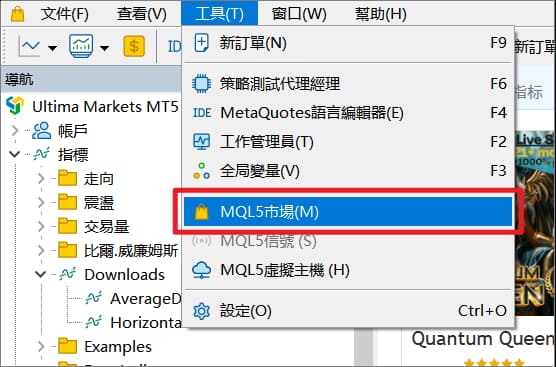
您可以直接在MT5軟件內部訪問代碼庫,無需額外打開瀏覽器。具體路徑如下:
MT5主界面 → 工具 → MQL5市場
通過這一路徑,交易者可以方便地瀏覽、下載並安裝各種技術指標與工具。

MT5代碼庫下載示意圖-Ultima Markets
MT5代碼庫下載示意圖

在代碼庫頁面中,可以通過名稱進行搜索,也可以按趨勢類、振盪類、EA、腳本等分類瀏覽,還能查看當前最受歡迎的下載排行,方便快速找到所需的指標或工具。

MT5代碼庫界面示意圖-Ultima Markets
MT5代碼庫界面示意圖

如何下載MT5代碼庫的指標?

點擊任意一個指標後,系統會跳轉到該指標的詳細介紹頁面,你可以在這裏查看功能說明、使用方法和用戶評價。確認無誤後,直接點擊頁面中的“下載”按鈕即可將該指標添加到MT5中。

下載MT5代碼庫指標-Ultima Markets
下載MT5代碼庫指標

下載完成後,該指標會自動安裝到MT5平臺中,並出現在左側導航欄的指標列表裏,無需手動導入。你只需將其拖拽到圖表上,或通過插入指標菜單進行加載即可立即開始使用。

MT5代碼庫指標-Ultima Markets
MT5代碼庫指標

如何手動爲MT5添加指標?

手動爲MT5添加指標的過程非常簡單。首先,在MT5頂部菜單中選擇“文件(File),然後打開數據文件夾(Open Data Folder)”,進入平臺的數據目錄。

隨後依次打開MQL5、Indicators文件夾,並將你下載好的指標文件(後綴爲 .mq5 或 .ex5)複製到該目錄中。完成後重啓MT5,或在導航欄中右鍵點擊“刷新”,新添加的指標就會出現在指標(Indicators)的自定義(Custom)列表中。最後,將指標拖拽到圖表或雙擊加載,即可開始使用。

MT5代碼庫指標自定義-Ultima Markets
MT5代碼庫指標自定義

MT5代碼庫還有什麼資源

在MT5平臺中,所有可下載的工具大致分爲三類:指標(Indicators)、智能交易系統EA(Expert Advisors)和腳本(Scripts),它們各自的功能和用途明顯不同。

指標(Indicators)

指標是MT5中用於分析行情的可視化工具,常見的包括趨勢類指標、震盪指標、成交量分析工具等。指標本身並不具備自動交易功能,它們只承擔分析和提示的作用,最終的交易決策仍需由交易者根據策略和經驗來做出。因此,指標更適合用於輔助判斷,而非直接執行交易。

智能交易系統EA(Expert Advisors)

EA(Expert Advisor)是一種運行在MT5平臺上的自動化交易程序,可以依據預設的交易策略持續分析市場行情,並在滿足條件時自動執行下單、平倉、移動止損以及風險管理等操作。是許多專業交易員和量化團隊在MT5上的重要配置。

智能交易系統EA界面示意圖-Ultima Markets
智能交易系統EA界面示意圖

腳本(Scripts)

腳本(Script)是在MT5平臺上一種用於一次性執行特定任務的小程序,其核心特點是“執行即完成”。它常被用於處理一些需要快速操作、但人工執行較繁瑣的任務,例如一鍵平倉、批量下單、修改訂單參數、刪除掛單,甚至是整理圖表對象等。腳本的目的不是分析市場,而是幫助交易者以最簡化的方式完成某個具體動作,因此在提高交易效率方面非常實用。與EA最大的區別在於,腳本不會持續運行,也不會在後臺監控行情;它只在被拖入圖表或雙擊啓動的那一刻立即執行指令,然後停止工作。此外,腳本也不同於指標,它不會在圖表上顯示任何分析結果或可視化信息,而是專注於任務執行本身,是簡化操作流程、提升效率的理想工具,特別適合需要重複性操作的交易者使用。

小結:善用MT5代碼庫提升交易水平

MT5代碼庫可以在MT5軟件中打開市場直接調出。由於MT5自帶了完整的MetaQuotes MQL5代碼庫,所以基本可以實現一鍵下載指標,再在指標列表應用。除了指標外,MetaQuotes MQL5代碼庫還有腳本和EA自動化交易程序可供下載。瞭解三者的區別有助於你根據自身需求選擇合適的MT5工具,優化交易流程。

使用MT5指標庫的常見問題FAQ

1. MT5指標後綴爲 .ex5和 .mq5有什麼區別?

不同的下載方式會產生不同的文件格式。.ex5是已編譯文件,無法查看或修改源碼,只能直接使用;而 .mq5則爲源碼文件,可查看並編輯指標邏輯,更適合進階交易者與程序員。通常,通過MT5內置的指標庫下載得到的是 .ex5文件,而從官網指標庫下載的則多爲 .mq5源碼文件。

2. 下載的MT5指標可以在手機端MT5使用嗎?

交易者只能在PC端安裝和使用自定義指標,包括從指標庫下載的免費指標以及任何第三方開發的工具。用戶在手機端MT5上只能使用平臺內置的基礎技術指標,如移動平均線、MACD、RSI等。因此,如果需要使用更復雜或個性化的技術指標,必須在電腦端完成安裝與操作。

3. 如何判斷一個MT5指標是否靠譜?

選擇MT5指標時可以從四個方面判斷其可靠性:首先查看評分與下載量,數據越高通常代表用戶認可度越強;其次關注最後更新日期,優先選擇維護頻繁、與最新MT5版本兼容的指標;第三是作者信譽,觀察其在MQL5社區是否活躍、是否有持續輸出;最後,查看是否提供源碼,源碼版更透明,也便於自主檢查和修改邏輯。

立即分享

  • Article Details
  • Article Details
  • Article Details

免責聲明: 本內容僅供信息參考之用,不構成,也不應被視為任何形式的金融、投資或其他專業建議。文中所述觀點或意見,均不代表 Ultima Markets 或作者對任何具體投資產品、策略或交易行為的推薦。讀者在做出投資決策時,不應僅依賴本內容,建議根據自身情況尋求獨立的專業意見。

目錄

  • MT5代碼庫在哪?
  • 如何下載MT5代碼庫的指標?
  • 如何手動爲MT5添加指標?
  • MT5代碼庫還有什麼資源
  • 小結:善用MT5代碼庫提升交易水平
  • 使用MT5指標庫的常見問題FAQ
Ultimate Trader Cup

Thank you for visiting the Ultima Markets website. Please note that this website is intended for individuals residing in jurisdictions where accessing is permitted by law. Ultima and its affiliated entities do not operate in your home jurisdictions.

By clicking on ''Acknowledge'', you confirm that you are entering this website solely based on your initiative and not as a result of any specific marketing outreach. You wish to obtain information from this website based on reverse solicitation principles, in accordance with the applicable laws of your home jurisdiction.