Important Information

This website is managed by Ultima Markets’ international entities, and it’s important to emphasise that they are not subject to regulation by the FCA in the UK. Therefore, you must understand that you will not have the FCA’s protection when investing through this website – for example:

  • You will not be guaranteed Negative Balance Protection
  • You will not be protected by FCA’s leverage restrictions
  • You will not have the right to settle disputes via the Financial Ombudsman Service (FOS)
  • You will not be protected by Financial Services Compensation Scheme (FSCS)
  • Any monies deposited will not be afforded the protection required under the FCA Client Assets Sourcebook. The level of protection for your funds will be determined by the regulations of the relevant local regulator.

Note: UK clients are kindly invited to visit https://www.ultima-markets.co.uk/. Ultima Markets UK expects to begin onboarding UK clients in accordance with FCA regulatory requirements in 2026.

If you would like to proceed and visit this website, you acknowledge and confirm the following:

  • 1.The website is owned by Ultima Markets’ international entities and not by Ultima Markets UK Ltd, which is regulated by the FCA.
  • 2.Ultima Markets Limited, or any of the Ultima Markets international entities, are neither based in the UK nor licensed by the FCA.
  • 3.You are accessing the website at your own initiative and have not been solicited by Ultima Markets Limited in any way.
  • 4.Investing through this website does not grant you the protections provided by the FCA.
  • 5.Should you choose to invest through this website or with any of the international Ultima Markets entities, you will be subject to the rules and regulations of the relevant international regulatory authorities, not the FCA.

Ultima Markets wants to make it clear that we are duly licensed and authorised to offer the services and financial derivative products listed on our website. Individuals accessing this website and registering a trading account do so entirely of their own volition and without prior solicitation.
By confirming your decision to proceed with entering the website, you hereby affirm that this decision was solely initiated by you, and no solicitation has been made by any Ultima Markets entity.

I confirm my intention to proceed and enter this website Please direct me to the website operated by Ultima Markets , regulated by the FCA in the United Kingdom
Roll Arrow
Ultima Markets Silver & Gold Trading Icon
Buy: 0.00
Sell: 0.00%

MT5外汇交易平台完整指南:2025最新下载安装与使用教程(新手必看)

MetaTrader 5(简称MT5)是由MetaQuotes推出的新一代多资产交易平台。MT5不仅支持外汇交易,还覆盖股票、指数、商品、大宗商品和加密货币等CFD产品。在全球外汇差价合约CFD交易市场中,MT5已成为投资者最常用也最受欢迎的交易平台之一。无论你是外汇交易新手,还是拥有多年经验的专业交易者,MT5都能提供从技术分析、智能交易到多资产管理的一站式解决方案。

1. MT5下载与安装(新手指南)

要在MT5平台上进行外汇差价合约交易,交易者必须先选择一家正规受监管的外汇经纪商注册账户并登录。优质的MT5经纪商通常受到FCA、FSC等国际权威监管机构监督,能够确保交易环境透明、资金安全可靠、交易执行稳定。以Ultima Markets为例,该经纪商不仅同时获得FCA与FSC的双重监管牌照,还加入了国际知名的The Financial Commission(金融委员会)。多层监管框架为用户提供更高等级的资金安全保障与交易纠纷仲裁机制。

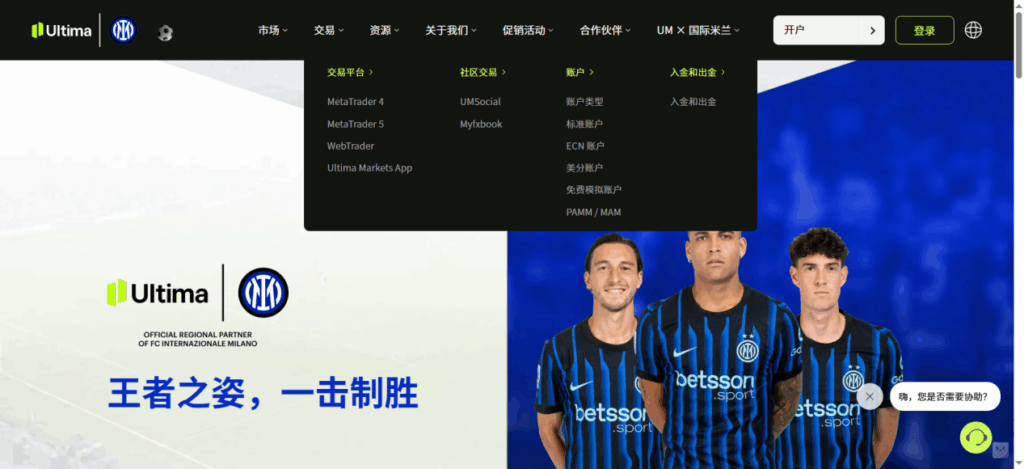
进入Ultima Markets官网,在首页导航栏找到“交易”菜单,并从下拉选项中选择“MetaTrader 5”交易平台即可。

Ultima Markets官网:https://www.ultimamarkets.com/cn/

下载MT5后,您需要一个交易账户才能登录平台、查看实时行情和执行交易。点击官网首页顶部的“开户”,按照指引提交相关资料即可完成开户流程。开户成功后,系统会向您发送可用于MT5登录的账号与密码,您即可开始正式交易。

如果您是初学者,也可以选择“开设模拟账户”。模拟账户无需承担真实资金风险,适合用于熟悉操作界面、测试交易策略以及了解实时市场环境,有助于更快掌握MT5的核心功能。

在优质的经纪商开户,不仅能够确保资金安全,还能为从初学者到高级交易者提供全面的教育资源和交易支持。交易者可以通过Ultima Markets官网“资源”获取更多交易知识和金融资讯。

2. MT5图表查看与交易操作

查看图表

在MT5平台中,交易者既可以查看图表,也可以直接在图表界面完成下单操作。以EURUSD为例,您可以通过菜单栏选择“建立新图表”,在品种列表中找到EURUSD,左键点击即可打开其行情图表,开始进行分析或下单。

(MT5建立新图表界面,Ultima Markets MT5教学示例)

下单操作

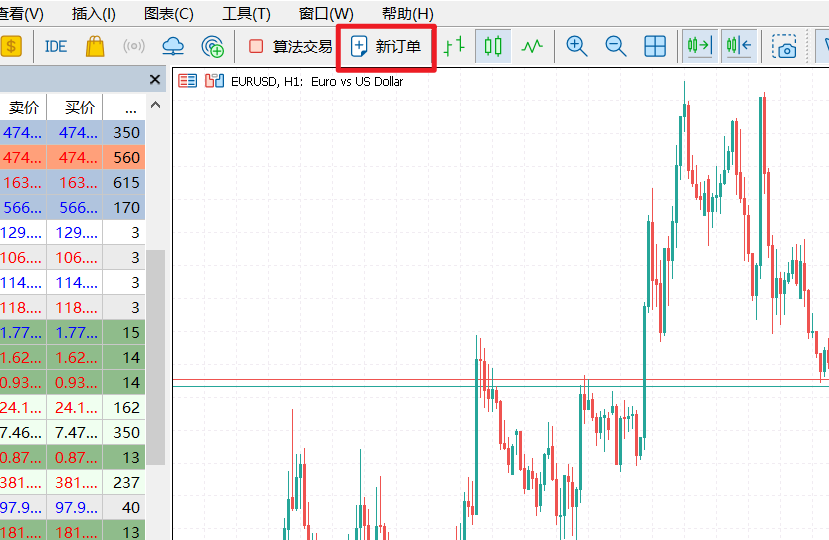
打开图表后,系统将显示该品种的K线走势图。若您需要执行交易,可点击界面上方的“新订单”按钮,调出交易面板并进行下单操作。

(MT5新订单,Ultima Markets MT5教学示例)

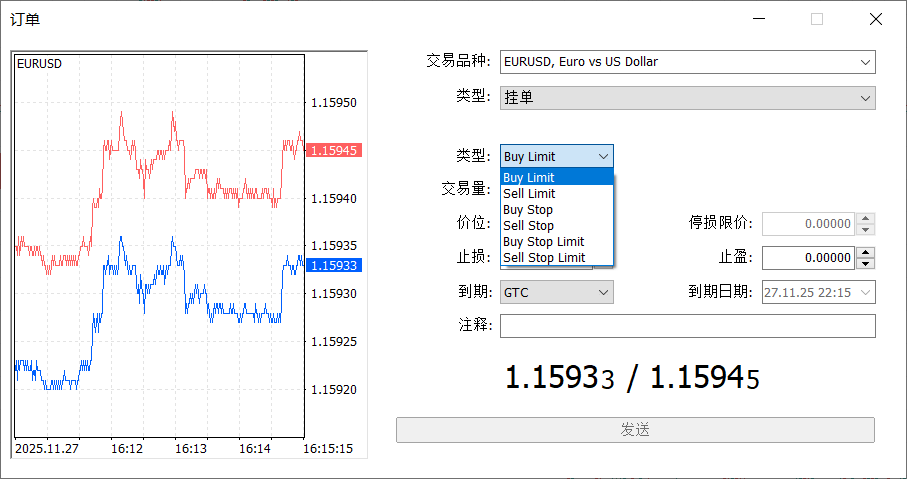
MT5中的订单主要分为两大类:市场执行与挂单交易。市场执行指按照当前市场价格立即成交;挂单交易则是在价格触及您预设的条件时自动开仓。

(新订单界面,Ultima Markets MT5教学示例)

MT5有以下6种挂单交易类型。

Buy Limit:回调做多,即希望在价格下跌到某个更低的价格时买入。适合“逢低做多”的交易思路。例如,EURUSD当前价格为1.1000,您想等回调到1.0950再买入,就可使用Buy Limit挂单。

Sell Limit:反弹做空,即希望在价格上升到某个更高的价格时卖出。适合“逢高做空”的交易思路。例如,EURUSD当前价格为1.1000,您想等反弹到1.1050再做空,就可使用Sell Limit挂单。

Buy Stop:突破做多。当价格上涨突破某个更高价位时买入。适合“突破做多”的交易策略。例如,EURUSD当前价格在1.1000,您想在价格突破1.1030时追多,就可使用Buy Stop挂单。

Sell Stop:突破做空。当价格下跌突破某个价位时做空。适合“突破做空”的交易策略。例如,EURUSD当前价格在1.1000,您想在价格下破1.0970时继续追空,就可使用Sell Stop。

Buy Stop Limit:这是Buy Stop + Buy Limit的组合挂单,先执行Stop,再执行Limit。当价格涨到Stop的位置时,挂单立刻变成Buy Limit,再等到价格下跌到Limit的价格时,多单入场。适用于价格上涨突破某一阻力位后,等回调再做多。

Sell Stop Limit:这是Sell Stop + Sell Limit的组合挂单,也是先执行Stop,再执行Limit。当价格跌到Stop的位置时,挂单立刻变成Sell Limit,再等到价格反弹到Limit的价格时,空单入场。适用于价格下跌突破某一支撑位后,等反弹再做空。

平仓操作

当交易者设置了止盈或止损后,MT5会在市场价格触及设定目标时自动平仓,从而帮助控制风险和锁定利润。此外,交易者也可以通过双击当前持仓订单,手动执行平仓操作,实现灵活管理。

(持仓订单界面,Ultima Markets MT5教学示例)

3. MT5适合哪些交易

MT5尤其适合对技术分析与自动化交易有较高需求的交易者。

对于日内交易者而言,MT5提供更多时间周期、丰富的技术指标以及快速数据刷新,让短线布局更高效;而剥头皮交易者则更能从其低延迟执行、多线程架构以及方便的图表快捷下单中获益,大幅提升进出场效率。

同时,MT5支持EA自动化交易,交易者可以使用MQL5编写策略,或在市场中选择适合的EA,实现24小时自动执行。除了外汇,Ultima Markets的MT5平台还支持黄金、指数、大宗商品、加密货币等多类资产,满足投资者的组合配置需求。因此,无论你是追求快速执行的短线交易者,还是依赖技术分析与自动化策略的专业交易者,MT5都是一个稳定、强大的理想交易平台。

4. 常见问题

4.1 MT5是免费的吗?

是的,下载和使用MT5平台完全免费。您可以在电脑或手机上直接下载安装,并按照指引注册账户。平台还提供模拟账户,让您在无风险环境下练习操作、测试策略,零成本体验MT5的全部核心功能。当您准备开始真实交易时,再进行入金操作,Ultima Markets最低入金门槛仅为50美元,对新手学习交易而言非常有利。

4.2 MT5怎么设置中文界面?

打开MT5客户端。点击顶部菜单栏的“View(视图)”。选择“Languages(语言)”。在弹出的语言列表中找到“Chinese (Simplified)”,点击选择。系统会提示重启MT5,点击“Restart”即可生效。

4.3 哪里可以获取更多MT5的学习资料?

在Ultima Markets官网的“资源”栏目中,您可以找到包含学院课程、市场分析、交易工具等在内的丰富学习资料,帮助您系统提升交易知识与技能。

立即分享

  • Article Details
  • Article Details
  • Article Details

Thank you for visiting the Ultima Markets website. Please note that this website is intended for individuals residing in jurisdictions where accessing is permitted by law. Ultima and its affiliated entities do not operate in your home jurisdictions.

By clicking on ''Acknowledge'', you confirm that you are entering this website solely based on your initiative and not as a result of any specific marketing outreach. You wish to obtain information from this website based on reverse solicitation principles, in accordance with the applicable laws of your home jurisdiction.